Support
Write to help@flipcorder.app.
If something is broken, say what you were doing, which iPhone, and which version of iOS. A screenshot helps.
Writing about Flipcorder? The press kit has the screenshots, the app icon and the facts.
How do I turn it on?
Press the glowing POWER key. On iPhone Duo, open the phone instead: opening it switches the camcorder on. You can also film with it shut: flick the lens cap off, or press POWER on the outer screen.
Why 20 seconds?
Short flips make filming a small, deliberate thing: you catch the moment and get back to it. A day of them plays back as one raw film you’ll actually want to watch, not an hour of video nobody opens.
Can I film for longer?
Yes. In the camcorder’s settings, set Flip length to No limit, and a recording runs until you stop it or today’s tape is full. It’s the same app at the same price, with nothing to unlock.
What quality does it record?
Clean HD, up to 1080p at 30 frames a second, by default. In the camcorder’s settings, Quality can be Best (1080p), Smaller (720p) or Smallest (720p, smaller still), for flips you film from then on. A camera that can’t record 1080p uses 720p. Everything stays on your iPhone; nothing is uploaded.
Can I change a tape’s look later?
Yes. Flips are filmed clean, and the VHS or MiniDV look is drawn on top as you film and play, never baked into your flips. Switch a tape’s look whenever you like, or save it as the clean HD original with no look at all.
What happens when today’s tape is full?
Each day’s tape holds 30 minutes, like a real camcorder cassette, and the camcorder shows how much is left. When it’s full, recording stops and saves what you filmed, then rests until a fresh tape loads at midnight. You can still play, save and share today’s tape.
Where do my videos go?
Everything you film in a day lands on that day’s tape, and your tapes stand on a shelf in the app. They stay on your iPhone until you save a tape to Photos or share it.
How do I save and share a tape?
Play the tape and choose Save to Photos. You can keep the camcorder look, or save the clean HD original instead. Then share it straight from the camcorder, or from Photos, with anyone you like. By default the movie opens on a title card and ends with a short sign-off, never a watermark over your video.
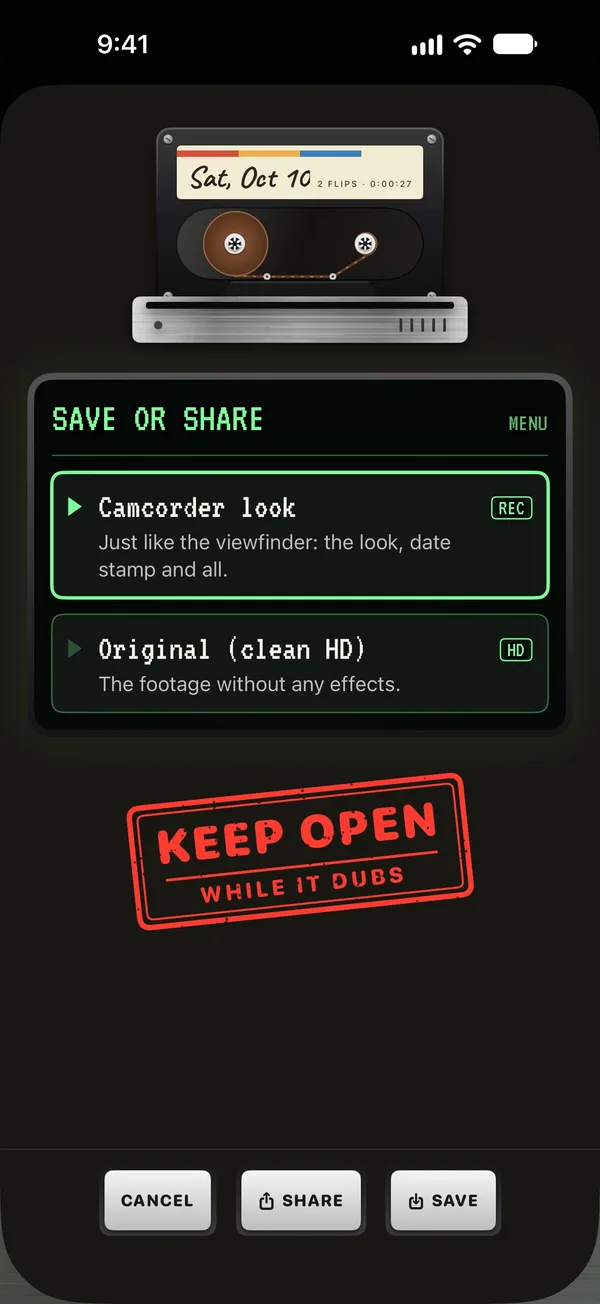
Can each flip go to Photos as soon as I film it?
Yes, if you like. In the camcorder’s settings, turn on “Copy new flips to Photos” (it’s off by default). Each flip is then added to Photos just as the camera recorded it, with no look, date stamp or title card, and it stays on its tape too.
Does it have widgets?
Yes. A Home Screen widget, in small, medium and large, shows today’s tape as a cassette, with a flip from today in its window. On the Lock Screen there’s an inline line, a rectangular widget with the latest flip, and a round one with a cassette over the count. Tap one and the camcorder opens ready to film, or today’s tape starts playing. It never starts recording by itself. There are also Streak (Home Screen, Lock Screen and StandBy), This week (Home Screen and StandBy) and Next sticker, which shows the sticker you’re closest to and how far there is to go. They never show a picture of a flip.
Can I hide the pictures in widgets?
Yes. In the camcorder’s settings, switch off “Show flips in widgets” (it’s on by default). The widgets then show the cassette and the count, never a picture, and the app removes the pictures it made for them.
Is there a quicker way to start filming?
Yes, three. Add the Record control to Control Center, a slot at the bottom of the Lock Screen, or the Action button. Ask Siri to “Record on Flipcorder”, or find it in Spotlight and the Shortcuts app. Or touch and hold Flipcorder on the Home Screen and choose Record. Each one opens the camcorder on today’s tape, ready to film, and never starts recording by itself. From the Lock Screen, your iPhone asks you to unlock first.
Do reminders need an account?
No. Reminders are off until you turn them on, and they’re scheduled on your iPhone as ordinary notifications. There’s no account, and nothing about you or your tapes is sent anywhere. Turn them off any time in the camcorder’s settings.
Will it nag me or keep a streak?
It won’t nag. There’s a kind streak that counts the days you film, and it’s only ever good news. A full week of flips earns a spare tape that covers the odd day off, and Put it in the bag pauses the count while you’re away. If a streak ends, the longest one and every sticker are kept, and the next flip starts a new count. Reminders never count the days you missed, and they stop by themselves if you stop opening the app.
What’s in the camcorder bag?
Open it from the tape shelf. It holds your Home Video Club card (tap its signature strip to write a nickname), a torn rental slip with your days on tape, this week and your spare tapes, and your sticker sheet. Stickers are earned by filming: first flips, full tapes, days on tape, a theme taken, and a few hidden ones. Each new one is stuck on the tape that earned it. Tap SHARE to share the bag, your week or a sticker as a little card, tall or square. A card never shows your footage.
What’s the theme of the day?
Today’s blank cassette offers a theme in small print. Tap Take the theme and it becomes the tape’s label, and the end card of your saved movie carries it. It’s only an invitation: it’s never checked, and any flip counts. Turn it off in the camcorder’s settings under Theme of the day.
Do I need an iPhone Duo?
No. Flipcorder works on any iPhone with iOS 26 or later. iPhone Duo adds the fold as the power switch, and the person you’re filming sees themselves on the outside screen; those extras need iOS 27.1. It also films with iPhone Duo shut, and half open on a table it splits, with the picture on top and the deck below.
Can I film with iPhone Duo shut?
Yes. Flick the lens cap off, or press POWER, and the outer screen becomes the camcorder, with the back camera. Press POWER again to switch off, or leave it: if you don’t film for a while, it switches itself off. Open the phone mid-flip and the flip carries on.
What happens if I close my phone while recording?
Your flip is saved first, then the camcorder switches off.
What happens if I get a phone call while I’m filming?
A ringing call doesn’t stop anything. Once a call connects, your flip is saved first, and the camcorder waits quietly, with a note in the viewfinder, until the call is over. Then the camera starts again by itself whenever Flipcorder is on screen.
Why is the outside screen of my iPhone Duo dark?
The person you’re filming sees themselves when your iPhone Duo is fully open and the camera is on. Open it all the way. Half open on a table with the outside screen facing down, it goes dark on purpose, and lights again when you open it flat or pick it up.